For gradient-based inference using SVGD, the jax library is also required:
pip install phasic[jax]
Your First Model
Phase-type distributions describe waiting time until the end of a Markov jump process - systems that move through multiple states on its the way to a final (absorbing) state. A Markov jump process is a system that exists in one of several states at any moment and randomly jumps between states at rates determined only by the present state.
The simplest possible model has a single state in where it stays with process—you start, wait some random amount of time, then finish.
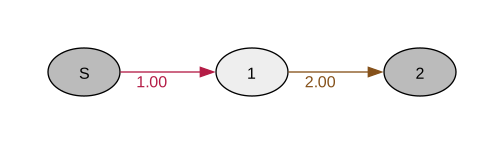
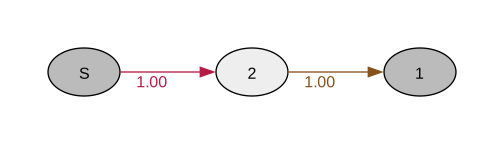
Below we construct a model of a Markov jump process with just a single state. The model is formulated as a graph created using the Python API. The Graph object automatically includes a starting vertex, which we retrieve, and then we create an absorbing state (the end point) using find_or_create_vertex(). Finally, we connect these states with an edge whose weight represents the transition rate:
from phasic import Graph# Create a graph with 1-dimensional statesgraph = Graph(1)# Get the builtin starting statestart = graph.starting_vertex()# this connects to a waiting statevertex = graph.find_or_create_vertex([1])start.add_edge(vertex, 1.0)# which, in turn, connect to an absorbing state with a rate of 2absorbing_vertex = graph.find_or_create_vertex([2])vertex.add_edge(absorbing_vertex, 2.0)graph.plot()
This models an exponential distribution with rate 2.0. Once we’ve constructed the graph, we can compute moments directly. The expected waiting time is 1/rate = 0.5, which we verify by calling expectation() on the graph:
graph.expectation()
0.5
Computing Distributions
Once you’ve built a model, you can compute probability distributions. Below we demonstrate how to evaluate both the probability density function (PDF) and cumulative distribution function (CDF) at specific time points. The pdf() method returns the probability density at a given time, while cdf() returns the probability that the waiting time is less than or equal to that time:
import numpy as np# Evaluate PDF (probability density function)time =1.0density = graph.pdf(time)print(f"PDF at t=1: {density}")# Evaluate CDF (cumulative distribution)prob = graph.cdf(time)print(f"P(T ≤ 1) = {prob}")# Or evaluate at multiple timestimes = np.linspace(0, 5, 100)pdf_values = np.array([graph.pdf(t) for t in times])cdf_values = np.array([graph.cdf(t) for t in times])
PDF at t=1: 0.0
P(T ≤ 1) = 2.0
Beyond computing distributions analytically, you can also draw random samples from the distribution. This is useful for Monte Carlo simulation or for validating your model by comparing sample statistics to theoretical moments:
# Sample 1000 waiting timessamples = graph.sample(1000)print(samples[:10]) # Show first 10 samplesprint(f"Sample mean: {np.mean(samples):.3f}")
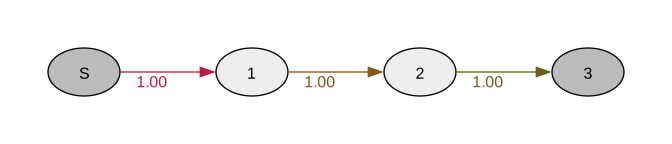
Real processes often have multiple stages. In the example below, we construct a three-stage process known as an Erlang distribution. The process must pass through three consecutive states before reaching absorption. We create each state using find_or_create_vertex() with different state labels, then connect them sequentially using add_edge(). Each transition has the same rate (1.0), so the expected time in each stage is 1.0, and the total expected time is the sum across all stages:
graph = Graph(1)# Create states: start (0) → stage1 → stage2 → endstart = graph.starting_vertex()stage1 = graph.find_or_create_vertex([1])stage2 = graph.find_or_create_vertex([2])end = graph.find_or_create_vertex([3])# Connect them with ratesstart.add_edge(stage1, 1.0)stage1.add_edge(stage2, 1.0)stage2.add_edge(end, 1.0)# Expected time is sum of stage times: 1/1 + 1/1 + 1/1 = 3expectation = graph.expected_waiting_time()[0]print(f"Expected time: {expectation}") # 3.0graph.plot()
Expected time: 2.0
Overriding theme from NOTEBOOK_THEME environment variable. <phasic._DeviceListFilter object at 0x1633a53d0>
Figure 1: Three-stage Erlang distribution model
Branching Processes
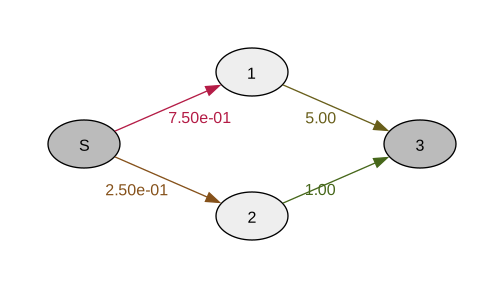
Processes can also branch—from one state, you might go to different next states with different probabilities. Below we extend the previous examples to include branching. We create two alternative paths from the starting state: a fast path and a slow path. The process randomly chooses one path at the start. When multiple edges leave a state, the relative rates determine the branching probabilities (3.0/(3.0+1.0) = 75% for the fast path). We then call normalize() to convert all transition rates into proper probabilities, ensuring they sum to one at each state:
graph = Graph(1)start = graph.starting_vertex()# Two possible pathsfast_path = graph.find_or_create_vertex([1])slow_path = graph.find_or_create_vertex([2])end = graph.find_or_create_vertex([3])# Branch at start (rates determine probabilities)start.add_edge(fast_path, 3.0) # 75% probabilitystart.add_edge(slow_path, 1.0) # 25% probability# After normalization, fast path completes quickly, slow path slowlygraph.normalize() # Convert rates to probabilitiesfast_path.add_edge(end, 5.0)slow_path.add_edge(end, 1.0)graph.plot()
Overriding theme from NOTEBOOK_THEME environment variable. <phasic._DeviceListFilter object at 0x1633a53d0>
Figure 2: Branching process with fast and slow paths
Rewards: Tracking Accumulated Values
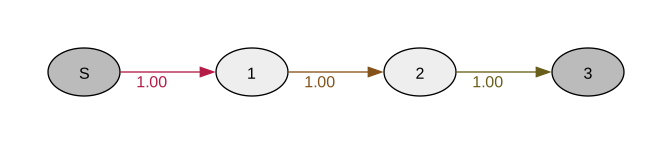
Often you want to track not just when something happens, but how much accumulates along the way. Rewards let you associate values with states. In the example below, we construct a simple three-stage process and then assign different reward values to each state. These rewards might represent costs, accumulated mutations, or any other quantity that accrues over time. By passing the reward array to expected_waiting_time(), we compute the expected accumulated reward—the sum of rewards weighted by the time spent in each state:
graph = Graph(1)start = graph.starting_vertex()state1 = graph.find_or_create_vertex([1])state2 = graph.find_or_create_vertex([2])end = graph.find_or_create_vertex([3])start.add_edge(state1, 1.0)state1.add_edge(state2, 1.0)state2.add_edge(end, 1.0)# Assign rewards to each state# For example: cost per unit time spent in each staterewards = np.array([0.0, 2.0, 5.0, 0.0]) # One reward per vertex# Expected accumulated reward (weighted waiting time)expected_reward = graph.expected_waiting_time(rewards)[0]print(f"Expected cost: {expected_reward}")graph.plot()
Expected cost: 7.0
Overriding theme from NOTEBOOK_THEME environment variable. <phasic._DeviceListFilter object at 0x1633a53d0>
Figure 3: Three-stage process with reward values
This computes the expected value of the accumulated reward—essentially the weighted sum of time spent in each state. Rewards are fundamental for working with multivariate phase-type distributions where you track multiple quantities simultaneously.
Building Complex State Spaces
For larger models, manually creating vertices becomes tedious. You can use a callback function to define transitions programmatically. In the example below, we demonstrate this with a simple coalescent model from population genetics. Instead of manually creating vertices and edges, we define a function build_transitions() that specifies what transitions are possible from any given state. The function receives a state (represented as a list of integers) and returns a list of possible transitions, each specified as a tuple of (next_state, rate).
When we pass this callback to Graph(), the library automatically explores the state space: it starts with an empty state, calls the function to find the next states, then recursively calls it for each new state discovered. This approach is particularly powerful for models where the state space structure is complex or depends on parameters:
def build_transitions(state):"""Define transitions from a given state.""" transitions = [] n = state[0]if n >1:# Coalescence rate: n choose 2 rate = n * (n -1) /2 transitions.append(([n -1], rate))return transitions# Build graph automaticallygraph = Graph(build_transitions, ipv=[([2], 1.0)] )# Compute expected coalescence timeexpectation = graph.expected_waiting_time()[0]print(f"Expected coalescence time: {expectation}")graph.plot()
Expected coalescence time: 1.0
Overriding theme from NOTEBOOK_THEME environment variable. <phasic._DeviceListFilter object at 0x1633a53d0>
Figure 4: Coalescent model built using callback function
The library automatically builds the state space by repeatedly calling your function for each newly discovered state. This callback-based construction is the foundation for building large, complex models efficiently.